
Chrome Extension Development Cost in 2026 — A Real Guide
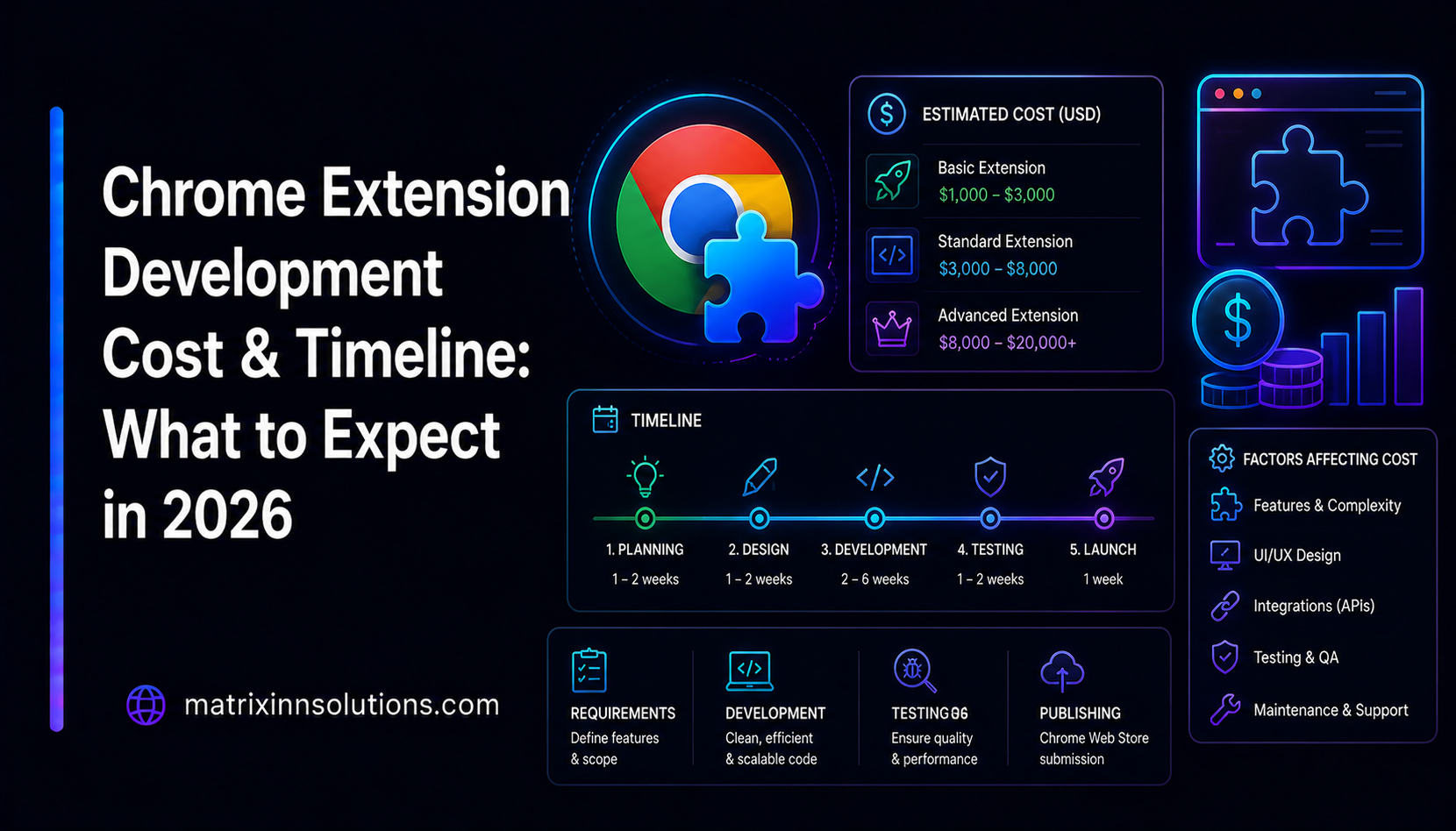
Browser extensions are one of the highest-leverage products you can build: small surface area, fast to ship, and they live right inside the user's workflow. But "small" does not always mean "cheap." The price of a custom Chrome extension can range from a quick fixed-bid build to a multi-month engagement, and the difference comes down to a handful of specific decisions. Here is what actually drives Chrome extension development cost in 2026 — the scope factors, realistic price and timeline bands, the Web Store review process, Manifest V3 migration, and how a serious shop quotes the work.
What drives Chrome extension development cost
Two extensions can look identical in a screenshot and differ by an order of magnitude in price. The cost lives below the surface, in five drivers.
1. Scope and surface area
A popup-only tool — one panel, a couple of buttons, no page interaction — is genuinely cheap and fast. The cost climbs the moment an extension has to inject UI into and read content from real websites. Every site is its own DOM, its own quirks, and its own breakage when the site ships a redesign. An extension that runs a content script across many domains is doing the hardest, least glamorous work in the whole category, and that long tail of sites is where most of the budget actually goes.
2. Manifest V3 complexity
Manifest V3 is the required modern platform, and its architecture shapes the build. Background logic now runs in an ephemeral service worker rather than a persistent page, network rules use declarativeNetRequest instead of blocking webRequest, and remotely hosted code is disallowed. For a fresh build these are constraints you design around; for older code they are the reason a migration is real engineering rather than a rename (more on that below).
3. Accounts, state, and backend
Login, syncing settings across devices, licensing, usage analytics, or any server-side processing turn a self-contained extension into a full application with an API, a database, and ongoing hosting. A backend is frequently the single biggest line item — it brings auth, data handling, a privacy posture, and maintenance that a purely local extension never incurs.
4. Cross-browser support: Chrome, Firefox, Edge, Safari
Chrome and Edge both run Chromium, so a Chrome extension typically works on Edge with minimal change. Firefox uses the standardized WebExtensions (browser.*) API surface, which is close but not identical, so a Firefox build adds testing and a few shims. Safari is the largest jump — it needs a separate Xcode wrapper and goes through Apple's distribution rather than the Web Store. Each browser you add multiplies QA, not just code.
5. The Chrome Web Store review process
Publishing is its own phase with its own cost in time and rework. Broad permissions, data collection, and running on many sites all increase scrutiny and the odds of a back-and-forth with the reviewers. Designing for a smooth review — minimal permissions, clear disclosures — is itself a cost factor, and skipping it usually costs more later.
Typical price and timeline bands
There is no single "Chrome extension price," but the work clusters into three bands. These are scope-and-effort tiers, not fixed quotes — your number depends on the specifics. Treat them as a way to locate your project before you talk to a developer.
Simple toolbar / single-action tool — about 1 to 3 weeks
A focused, single-purpose extension: a popup, a one-click action, a keyboard shortcut, a small content tweak, no accounts, no backend, Chrome only. Low surface area, fast review, the cheapest band. Most of our own utilities started life roughly here.
Mid-range productivity tool — about 3 to 6 weeks
Content scripts running across multiple sites, an options page, settings synced through chrome.storage, polished UI, and careful permission scoping. This is the most common band for a real product, and the multi-site behavior is the part that quietly stretches the timeline.
Complex extension with backend — about 6 weeks and up
Accounts and login, a server-side API and database, licensing or subscriptions, heavy per-site logic, and cross-browser distribution. This band behaves like building a small SaaS that happens to live in the browser, and it is scoped and priced accordingly.
The work hiding in extensions is the long tail of websites your content script has to behave on, and the review process at the end. That is where budgets quietly grow — almost never in the popup you sketched on day one.
The Chrome Web Store review gauntlet
Even a perfectly built extension is not done until it survives review. The Chrome Web Store review process can take anywhere from about a day to a couple of weeks, and the timing is not random — it tracks how risky your extension looks to a reviewer. Build with that in mind and you sail through; ignore it and you ship late.
The most common reasons extensions get rejected or delayed are predictable:
- Excessive or unjustified permissions. Requesting
<all_urls>or broad host access when a narrow match pattern would do is the classic flag. Every permission needs an obvious, single purpose. - A mismatch between what you request and what you do. Reviewers check that each permission maps to a visible feature. Unused permissions are a fast rejection.
- Weak or missing privacy disclosure. If you touch user data, you must declare it accurately and have a privacy policy. Vague or absent disclosures stall review.
- Remotely hosted code. Manifest V3 forbids loading executable code from a server. Anything that smells like remote code execution gets bounced.
- Misleading metadata or a thin listing. Keyword-stuffed titles, screenshots that don't match the product, or a one-line description invite a closer, slower look.
The fix for all of these is the same discipline that makes a good extension: ask for the minimum permissions, explain each one clearly, and collect no data you do not need. That both speeds approval and earns user trust — exactly how we shipped our own extensions.
Manifest V3 migration cost
If you already have a Manifest V2 extension, you are not migrating because you want to — V2 is no longer accepted, so migration is the price of staying publishable. The cost of a Manifest V3 migration scales directly with how much of the old code leaned on patterns V3 removed:
- Persistent background page → service worker. Background code now runs in an event-driven service worker that can be torn down at any time, so any logic that assumed always-on state has to be re-architected around persisted storage and message passing.
- Blocking webRequest → declarativeNetRequest. Extensions that modified or blocked network requests have to be rewritten as declarative rules, which is the most involved part of many migrations.
- Remotely hosted code → bundled code. Anything loaded from a remote URL must be packaged into the extension itself.
A small, simple extension can be migrated quickly. A large one built around those V2 patterns is closer to a partial rewrite, and should be scoped as such. Either way the honest move is to read the existing code first, then quote — never quote a migration blind.
Engagement models: fixed-bid vs. sprints
How you pay matters as much as what you pay. There are two sensible models for extension work, and we offer both.
- Fixed-bid. Best when the scope is clear. We turn a written spec into a fixed price and timeline so you know the number before work starts. Ideal for simple and well-defined mid-range builds, and for clean V3 migrations.
- Sprints. Best when the product will evolve — complex extensions, anything with a backend, or work where you expect to iterate on what users actually do. You fund focused, time-boxed sprints and steer the roadmap as you learn.
One thing does not change between models: you own the code. Source, repository, store listing, and accounts are yours. No lock-in, no per-seat surprises, no holding the build hostage. You can read exactly how we work on our browser extension development services page.
Proof: we ship our own extensions
It is easy to quote extension work; it is harder to live with it. We do both. MatrixInn builds and maintains its own published extensions, which means we have personally been through the scope creep, the review queue, and the Manifest V3 constraints on products we own.
- MatrixInn PiP — a picture-in-picture extension that pops video out of almost any website into a floating, always-on-top window. It is a great example of the "content script across the long tail of sites" problem done well. We wrote up the technique behind it in how to force picture-in-picture on any website.
- Privacy for WhatsApp — a privacy-focused extension that demonstrates the minimal-permissions, store-nothing posture that keeps review fast and users comfortable.
You can see these and our other apps on the products page. The point is simple: when we estimate your extension, the estimate comes from people who maintain extensions in production, not from a spreadsheet.
How to bring cost down without cutting corners
- Validate on Chrome first. Prove the product on one browser before paying to support every browser on day one.
- Scope permissions tightly. Narrow host patterns and the smallest permission set speed review and reduce security work.
- Write the spec before the code. A tight spec is the cheapest way to avoid rebuilding content-script behavior site by site.
- Defer the backend until it earns its place. Local-first extensions are cheaper, ship faster, and clear review more easily.