
What Is AI Automation? A Plain-English Guide for Business Owners
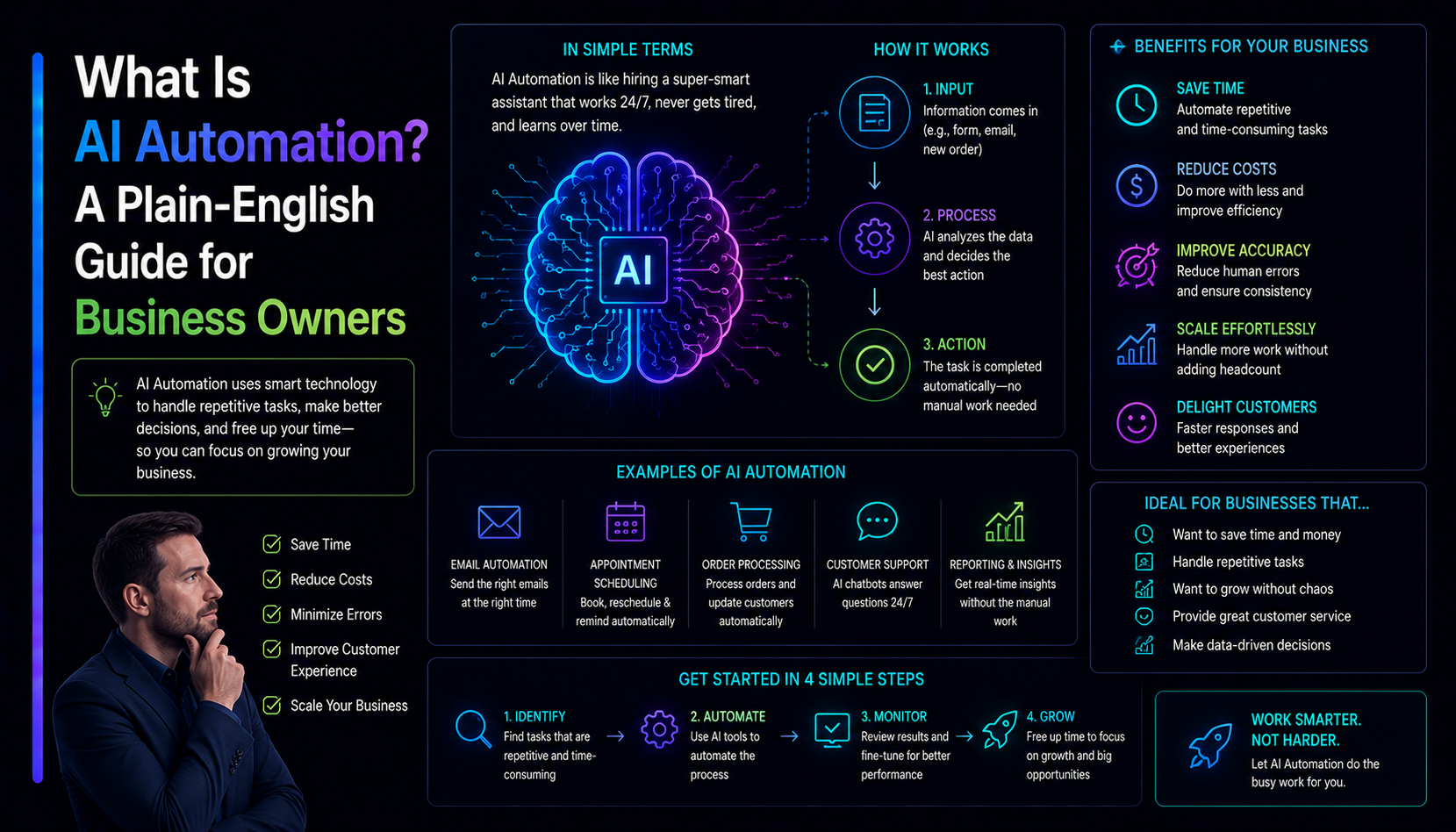
AI automation gets talked about in two very different ways: as a magic productivity multiplier that will replace every job, or as an overhyped buzzword that does not work in practice. Neither is accurate. AI automation is a specific set of tools and patterns that excel at a specific set of tasks — and understanding which tasks those are is the practical question that actually helps a business owner make a decision. This is that guide.
What AI automation actually means
Automation in software has existed for decades: if this happens, do that. Rule-based automation — if a form is submitted, send an email; if inventory falls below 10, reorder — is well understood, mature, and still very useful. AI automation adds a different capability: it can handle inputs that vary too much for rules to cover.
A rule can route an email to the right folder if the subject line contains "invoice." An AI can read the email body, understand the intent, extract the relevant details, draft a reply, and flag anything that needs human review — across emails that look completely different from each other. The practical difference is that AI handles variation and judgment; rules handle structure and repetition.
The tasks AI automation is actually good at
Not all work is automatable, and not all automatable work is worth automating. The tasks that fall into the sweet spot are ones that are:
- High volume. You are doing this hundreds or thousands of times, not occasionally. The return on investment only makes sense at scale.
- Text or document heavy. Reading emails, classifying support tickets, extracting data from PDFs, summarising reports — large language models do this well.
- Judgment-required but not deeply creative. Routing, triage, classification, and first-draft generation where the criteria are known but too varied for rigid rules.
- Currently done by a human for consistency reasons only. If a person is doing a task purely to format or route information rather than to add real judgment, an AI agent probably can do it too.
Six business processes where AI automation pays off
1. Customer support triage
Reading incoming support tickets, classifying them by type and urgency, routing them to the right team, and drafting a first response for agent review. This cuts the time a human spends on inbox management in half without reducing quality — the agent still sends the message, but it arrives pre-drafted and pre-classified.
2. Document extraction and processing
Pulling structured data from invoices, contracts, purchase orders, or application forms. A human reading hundreds of invoices per day to enter data into an accounting system is a solved problem in 2026. AI reads the document, writes to the system, and flags exceptions for review. Accuracy is high enough for most use cases with a human spot-check layer.
3. Lead qualification and CRM entry
Reading enquiry emails or form submissions, scoring the lead against qualification criteria, enriching the record with publicly available data, and updating the CRM. The sales team arrives each morning to qualified, enriched leads rather than a raw list of form submissions to manually process.
4. Content drafting and summarisation
First drafts of routine content — product descriptions, internal reports, meeting summaries, brief client updates. The human reviews and edits; the AI saves the first hour of staring at a blank page. This works best for content that follows a known structure and has clear input data to work from.
5. Data monitoring and alerts
Watching a data source — analytics, inventory, financial metrics, social mentions — and surfacing the items that need human attention rather than requiring a person to monitor it continuously. An AI agent that sends a plain-English Slack message when a metric crosses a threshold replaces a daily report that nobody reads.
6. Workflow orchestration across tools
Connecting tools that do not talk to each other — moving data between a CRM, an ERP, an email platform, and a project management tool based on business events. AI agents handle the translation and judgment calls that rule-based integrations fail on: mismatched data formats, ambiguous field mappings, and edge cases that a rigid rule would silently ignore or break on.
What AI automation is not good at
Being honest about the limits is as important as the examples above. AI automation struggles with:
- Tasks requiring original expertise. Strategy, creative direction, complex client relationships — these need human judgment that goes beyond pattern-matching on training data.
- Regulated sign-off requirements. Medical diagnoses, legal filings, and financial advice that require a licensed professional to stand behind the output still need licensed professionals, regardless of how confident an AI sounds.
- Genuinely novel situations. AI works by matching patterns from training data. A true crisis, a one-of-a-kind contract negotiation, or a situation with no precedent still requires human judgment.
- Tasks where errors compound silently. Any workflow where a mistake at step one poisons the downstream output needs careful human-in-the-loop design, not just automation.
The right question is not "can AI do this?" but "is AI doing this better and cheaper than the current approach, at the quality level the task requires?" For the right tasks, the answer is clearly yes in 2026.
How to start: the four-step approach
1. Audit your repetitive work
List the tasks your team does repeatedly that involve reading, classifying, extracting, or generating text. Estimate the hours per week per task. Rank by volume and pain. The highest-volume, most time-consuming tasks go to the top of the list.
2. Pick one workflow to prove it
Do not try to automate everything at once. Pick the single highest-volume, clearest-criteria task and build that first. The goal is a working system in production, not a roadmap of fifteen future automations. One live, measurable result is worth more than ten prototypes.
3. Define success before you build
How will you measure whether the automation is working? Accuracy rate? Hours saved per week? Error rate compared to manual processing? Define this before building — it is both your quality test and your business case for the next automation.
4. Keep a human in the loop on exceptions
The best AI automation systems flag cases they are uncertain about and route them to a human rather than guessing. An 80% automation rate with near-perfect accuracy on automated cases is better than 100% automation with a 5% error rate — the errors compound painfully in production, especially in customer-facing workflows.
What does AI automation cost to build?
It ranges widely depending on what you are automating. A simple document extraction workflow connected to a spreadsheet or Airtable takes days to build. A full AI agent that reads emails, updates a CRM, drafts replies, and escalates edge cases is several weeks of work. An enterprise-grade system with custom models and deep enterprise integrations is months. We scope each automation the same way we scope any software: define the input, the output, the quality bar, and the exception handling first, then price from there. Read more about our AI automation work or send us a brief.